3.9.0Feb 27, 2021 (Latest Version) |
- Publish Service: New feature - Reclaim Photos. Now you can download your photos from Costco's backend.
- Improved macOS Catalina and Big Sur support.
|
|---|
3.8.1Oct 11, 2020 |
- Fixed intermittent authentication issues.
- Resolved macOS Catalina compatibility issues.
|
|---|
3.8.0Jan 1, 2020 | |
|---|
3.6.0Nov 16, 2017 |
- Added Lightroom 7 support.
|
|---|
3.5.4Sep 10, 2016 |
- Fixed the issue with uploads to a new album.
|
|---|
3.5.3Sep 7, 2016 |
- Another fix for the authentication sequence.
|
|---|
3.5.2Aug 25, 2016 |
- Fixed the login sequence.
|
|---|
3.5.1Aug 9, 2016 |
- Fixed the certificate validation error.
|
|---|
3.5.0May 31, 2016 |
- Fixed the sign-in sequence following the recent change at Costco's backend.
- AutoUpdate - fixed a bug preventing the installation of plugin updates in some cases.
|
|---|
3.4.0Mar 19, 2016 |
- Lightroom 6: the removal of person tags now works correctly when the Remove Person Info option is in effect.
- Lightroom 6: Improved the image size validation mechanism. Now size validation works correctly when rendering uploads from smart previews and doing percentage-based resize.
- Completely redesigned the automatic update mechanism.
- The plugin handles slower connections better and automatically extends upload timeout value when necessary.
- Fixed a rare issue in which UTF8 encoding in watermark presets caused issues with the creation of editing of photo albums.
- Improved the diagnostic of upload failures due to incorrect image resizing.
- Export Dialog: now switching between export profiles works correctly.
- Other stability and performance improvements.
|
|---|
3.3.0Jun 27, 2015 |
- Publish Service: added the "Associate Images" feature for pairing previously published photos with photos in a Lightroom catalog.
- Publish Service: album settings - added "Remove Person Info" option (Lightroom 6).
- Improved the image size validation mechanism. Now size validation works correctly when rendering uploads from smart previews and doing percentage-based resize (Lightroom 6).
- Lightroom 6: fixed internal error "attempt to compare nil with number" on export when using "Percentage" as the resize type.
- Publish Service: fixed the issue with using global watermarks in folder-specific settings.
- Other minor bug fixes and improvements.
|
|---|
3.2.0Mar 21, 2015 |
- Export Settings: added low/high pixel threshold options for validading image size.
- Added a configuration option allowing to suppress upload errors until the very end of export operations.
- Fixed the issue with uploading to a new album.
- Improved handling of deleted albums.
- Other minor improvements.
|
|---|
3.1.0Feb 22, 2015 |
- Now the plugin is compatible with the new address of Costco's server.
- Implemented throttling of the rendering queue to protect against high disk space consumption during large exports (supported in Lightroom 5.0 and above).
- Implemented "POODLE" (SSL Vulnerability) detection and remediation.
- Export Dialog: implemented persistent caching. Once loaded from the server, album information is stored locally for quick access.
- Export Dialog: new Quick Filter feature which enables you to search albums using a text string.
- Export Dialog: improved the layout.
- New Album Dialog: Now you can paste the name of the currently selected folder or collection with a single click.
- Other minor fixes and improvements.
|
|---|
3.0.2Aug 22, 2014 |
- Fixed the issue with authentication (after another change at Costco's backend).
|
|---|
3.0.1Jul 27, 2014 |
- Fixed the "The requested resource no longer exists on the server" error.
- Fixed the issue with uploading photos (Mac OS).
|
|---|
3.0.0Jul 26, 2014 |
- The module responsible for back-end communication has been completely rewritten to the new Costco API.
- Now the plugin support Publish Services with the ability to import existing online albums.
- Minor fixes and improvements.
|
|---|
2.9.1Mar 15, 2014 |
- Upload size limit increased to 25 MB per photo to match the new requirement of Costco Canada.
- Fixed the link to the registration page.
|
|---|
2.9.0Feb 20, 2014 |
- Added the ability to initiate multiple uploads in parallel.
- Improved handling of large uploads.
- Added the ability to upload photos in their original format (without applying any conversion or resizing), provided the photos are already in JPEG format.
|
|---|
2.8.0Oct 15, 2013 |
- Added support for the new authentication scheme recently implemented at Costco Canada.
|
|---|
2.7.4Jul 11, 2013 |
- Fixed the issue with uploading photos to an empty album.
- Fixed the "Export with previous" functionality.
|
|---|
2.7.3Jun 12, 2013 |
- This update restores the operations after recent changes at the Costco back-end.
|
|---|
2.7.2May 21, 2013 |
- Fixed the issue uploading to existing albums, caused by a recent change at Costco Canada web site.
- Fixed: Exporting multiple images by choosing "New Album" prompts you to enter the name of the album for each image. Also caused by the change at Costco Canada.
- The plugin no longer allows creating multiple albums with the same name.
|
|---|
2.7.1Feb 18, 2013 |
- Fixed the issue with creating new albums
|
|---|
2.7.0Feb 11, 2013 |
- Code refactoring amd improved server error handling.
- Minor fixes and improvements.
|
|---|
2.6.0Nov 18, 2012 |
- Fixed: Costco Canada implemented another change on their back-end and broke my plugin.
- Implemented validation of album names.
- Improved the display of photo rendering and uploading phases on Lightroom's progress indicator.
- Improved server error handling.
NOTE: Please note, the extension name of the plugin's folder has been changed from .lrdevplugin to .lrplugin. If you are updating an older version of the plug-in you have two options:
- Remove the CostcoCaExport.lrdevplugin folder, then install the update using the new installation packages.
- Apply the auto-update. When you restart Lightroom you will be reminded to remove the .lrdevplugin folder and add the new .lrplugin folder (created by the auto-updater next to the old folder) using Lightroom Plugin Manager.
|
|---|
2.5.5Jul 29, 2012 | Restored the plugin's operation after a recent change at Costco's back-end. |
|---|
2.5.4Apr 18, 2012 |
- Fixed the "assertion failure" error when uploading to a new album.
- Added metadata fields for keeping track of photos uploaded via the plug-in. These fields store the upload status, date and time of the latest upload, and the album URL. You can access these fields in library filters, view them in the metadata browser (as “Costco Canada Metadata” tagset) and in smart collection filters.
|
|---|
2.5.3Apr 13, 2012 |
- Fixed the "Export with Previous" behavior.
- Fixed the error when you cancel out of the "Create New Album" dialog.
- Fixed issue with page caching on Costco's side - some images would take a few minutes to appear in the online album after the upload.
|
|---|
2.5.2Apr 3, 2012 |
- Added compatibility with Lightroom 4.
|
|---|
2.5.1Jan 22, 2012 |
- Fixed an itermittent issue with authenticating the user.
|
|---|
2.5.0Jan 8, 2012 |
- The plug-in now requires a small registration fee to cover the costs of continued development and support.
- Now authentication errors are displayed correctly.
- Improved error reporting for Internet connectivity related issues.
- Added the ability to retry uploading photos in case of a server communication failure.
- Fixed a couple of cosmetic issues with the Export dialog.
|
|---|
2.4.1May 18, 2011 |
- Fixes several issues caused by a recent internal change in Costco CA service.
- Photos that failed to upload are now displayed in a list box with the ability to save the list to a text file.
- The plug-in now can automatically update itself.
- The debug log is now submitted in a compressed form to improve performance.
- Now you can use the Enter key to start a new line in the Submit Debug Log window.
|
|---|
2.4.0Mar 27, 2011 |
- The plug-in is now compatible with Lightroom 3.4RC for Windows and Mac OS.
- Added validation of Image Sizing settings. The plug-in will issue a warning if the dimensions of rendered photos are outside of the 500 - 10000 pixels range.
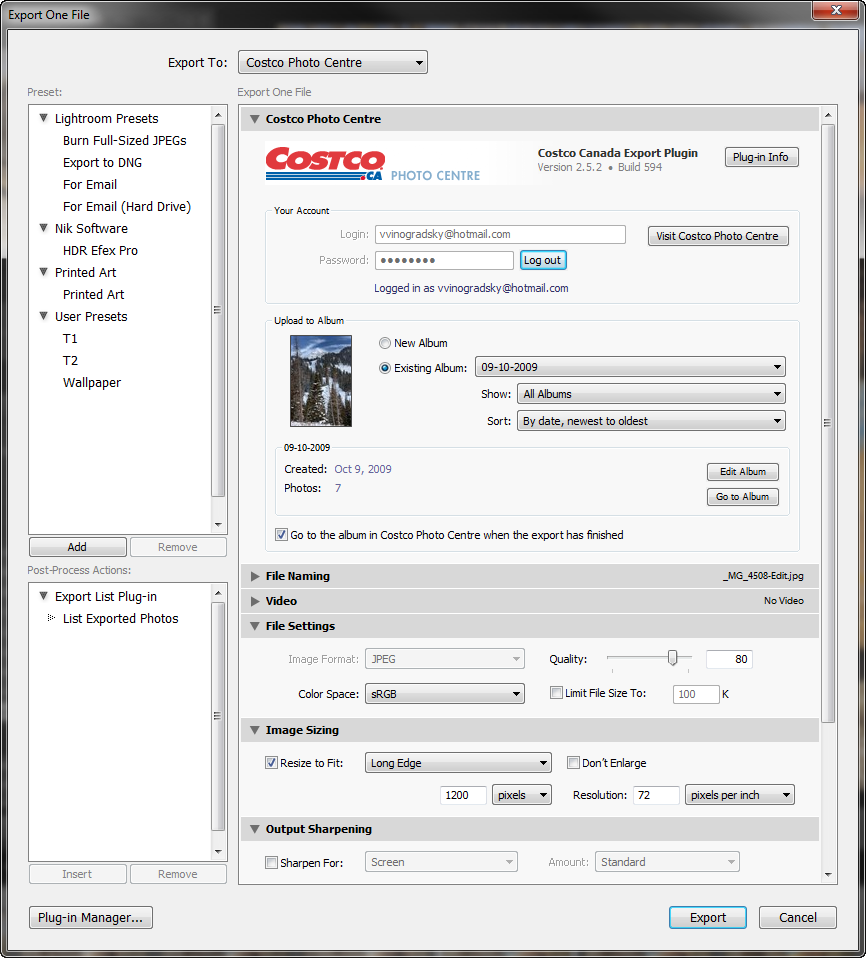
- Re-designed layout of the Export dialog to provide a better placement of album actions.
- Fixed the "Unexpected Server Response" error in some additional situations.
|
|---|
2.3.2Mar 14, 2011 |
- Fixed the "Unexpected server response" error
|
|---|
2.3.1Sep 25, 2010 | This is a quick fix for the "Unexpected Server Response" error caused by a recent change in Costco CA web service. |
|---|
2.3Aug 30, 2010 |
- Fixed an issue with uploading to a new album after performing an export to an existing album.
|
|---|
2.2Jul 25, 2010 |
- Added the ability to submit the debug log to alloyphoto directly from the plug-in.
- The plug-in is now compatible with Lightroom 3.
- Several minor fixes and improvements.
|
|---|
2.1May 9, 2010 |
- Fixed the issue with uploading photos caused by a recent change to the Costco Photo Centre service.
- Improved the export dialog’s layout to make status messages more visible and consistent.
|
|---|
20100209.4Feb 9, 2010 |
- Fixed a Mac specific issue with album drop-downs extending beyond the right side of the export dialog.
- In Lightroom 3 Beta, the photo lab logo is back on top of the Export dialog.
|
|---|
20100124.3Jan 24, 2010 |
- Implemented compatibility with Lightroom 3 Beta.
- Fixed the issue with some photos taking up to 5-10 minutes to appear in the target album after the export.
|
|---|
20091104.2Nov 4, 2009 |
- Fixed the issue with Costco server rejecting certain requests from the Mac version of Lightroom.
- Fixed the issue with creating new albums.
|
|---|
20091028.1Oct 28, 2009 | The initial release of the plug-in. |
|---|