Walmart Canada
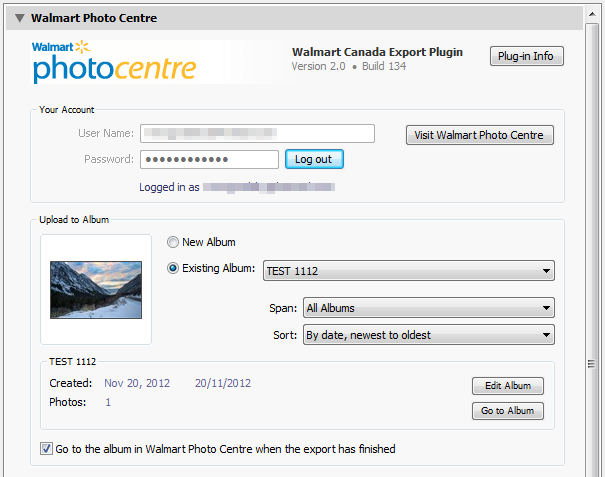
This plug-in allows Adobe Lightroom users to export and publish photos directly to the Walmart Photo Centre (Walmart Canada) operating at www.walmartphotocentre.ca
Features
- Supports Export operations
- Supports multiple accounts via export presets
- Enables you to manage albums right from Lighroom
Starting with version 2.3.0, the plugin also offers a fully featured publish service for Lightroom version 3 and above. With the publish service you can:
- Import your existing albums
- Associate previously uploaded online photos with photos in your Lightroom catalog
- Automatically publish updated photos
Requirements and Compatibility
The plugin supports both Windows and OS X, and is compatible with the following versions of Lightroom:
- Lightroom 2 (2.4 - 2.7)
- Lightroom 3 (3.3 - 3.6)
- Lightroom 4, 5, 6 / CC 2015
Licensing
This plug-in is released as Shareware (no source code provided). The license allows you to install the plugin on two computers, for example a desktop and a laptop computer, owned and operated by a single user.
When Lightroom is upgraded to a next major version (e.g. 9, 10, etc.), a new registration code needs to be purchased, unless your most recent purchase was made within a 3-month period before the release of the most recent Lightroom's major upgrade.
You may use the unregistered (free) version at no charge, however some features (see below) are limited or disabled in the free version.
Free (unregistered) Version Restrictions
Some features are limited or disabled in the free version of the plug-in:
- The export capability is limited to 10 photos at a time.
- The number of photos in a single album is limited to 10.
Version History
2.5.0Feb 21, 2014 (Latest Version) |
- Added the ability to initiate multiple uploads in parallel.
- Improved handling of large uploads.
- Added the ability to upload photos in their original format (without applying any conversion or resizing), provided the photos are already in JPEG format.
- Export Dialog: Added collision handling options.
- Associate Images: Now you can fine-tune file name matching using regular expressions.
- Publishing Service: Fixed the issue with re-publishing of existing photos.
- Fixed the Photo URL link in the WalmartCA metadata section.
|
|---|
2.4.0Oct 15, 2013 |
- Added support for the backend changes recently implemented at Walmart Canada.
|
|---|
2.3.0Sep 1, 2013 |
- Now the plugin support Publish Services with the abilities to import existing albums and associate previously uploaded photos with photos in your Lightroom catalog.
- Publish Service - Supports the ability to customize image size, resolution, metadata, and watermark options for each album.
- Walmart Canada Metadata - added a direct online URL for exported photos.
- Implemented the ability to deactivate the plugin's license so it can be installed on another computer.
- Minor fixes and improvements.
|
|---|
2.2.0Jun 27, 2013 |
- Fixed glitches with validating user credentials.
- Improved the handling of a Windows-specific HTTP Error 12032 (the action must be retried).
- Fixed the "Export with Previous" functionality after creating new albums.
- Minor fixes and improvements.
|
|---|
2.1.0Feb 12, 2013 |
- Added the option to validate photo size on export.
- Implemented validation of album names.
- Code refactoring amd improved handling of connection related errors.
- Minor fixes and improvements.
|
|---|
2.0.0Nov 21, 2012 |
- Fixed some backward compatibility issues with Lightroom 2.
- Now the plugin is compatible with Lightroom 4.
- Improved the internal diagnostic of Internet connection related issues.
- Improved the layout of the Export dialog.
- Other minor fixes and improvements.
NOTE: Starting with version 2.0 the plugin requires a registration fee of $10 to help offset the cost of development and support.
|
|---|
1.4Jan 3, 2011 |
- Fixed the issue with logging in when using Lightroom 3.0 for Mac OS.
- Now debug logs for troubleshooting can be submitted directly from the plug-in.
- Added the ability to rename albums.
- Added the ability to navigate to the selected album in the web browser.
|
|---|
1.3Jul 16, 2010 |
- Changed the version number format back to the classic form.
- Added the ability to submit the debug log to alloyphoto directly from the plug-in.
- Numerious cosmetic improvements and tweaks.
- The plug-in is now compatible with Lightroom 3.0. NOTE: Due to an internal issue in Lightroom 3.0 for Mac OS, the plug-in may still work incorrectly for Mac users.
|
|---|
20100125.2Jan 25, 2010 |
- Now the plug-in is compatible with Lightroom 3 Beta.
- Now the plug-in correctly handles the situation when you attempt to export photos that exceed the 6MB size limit of Walmart.
|
|---|
20091111.1Nov 11, 2009 | The initial release:
- User authentication at www.walmartphotocentre.ca
- Option to save the password in the preset
- Allows you to upload to an existing album or create a new album
- Uploading of an unlimited number of photos
- Album thumbnails
- Album list sorting and filtering
* Option to open your album in the web browser after the export
|
|---|