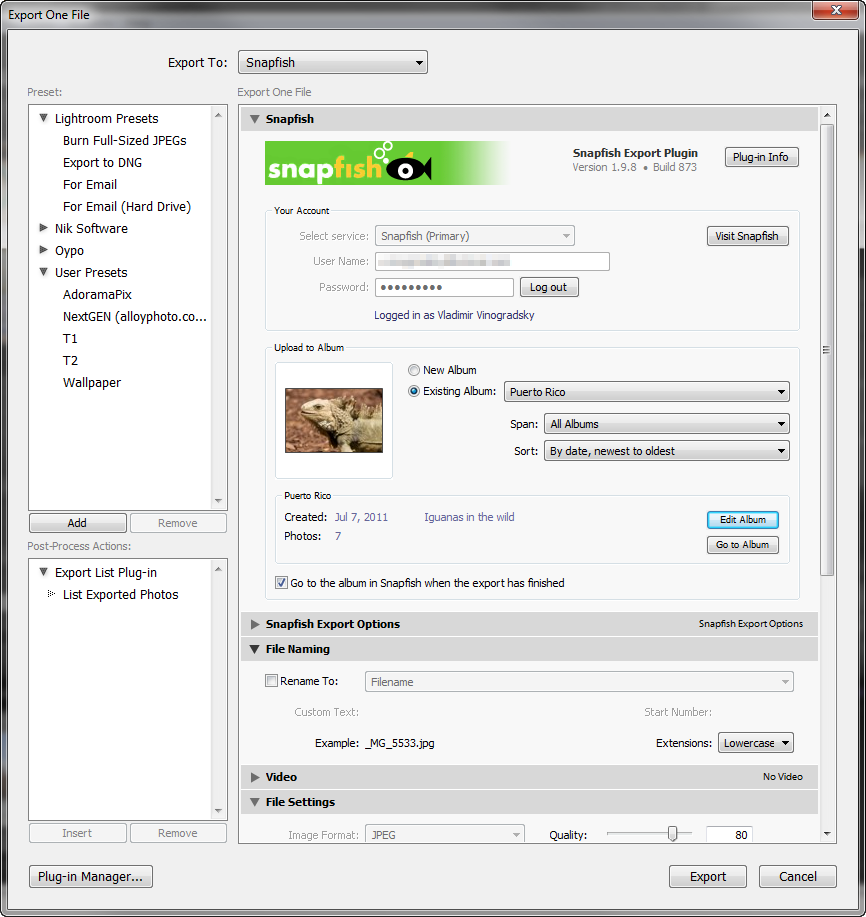
3.7.1Aug 16, 2020 (Latest Version) |
- macOS: The isntaller disk image is now properly signed and notarized for Catalina.
|
|---|
3.7.0Nov 17, 2019 |
- Lightoom Classic CC 9 compatibility.
|
|---|
3.5.0Mar 15, 2018 |
- Fixed a number of errors related to a recent change at Snapfish back-end.
- Other minor improvements.
|
|---|
3.4.2Nov 4, 2017 |
- Fixe the index error introduced in version 3.4.1.
|
|---|
3.4.1Nov 4, 2017 |
- Fixed HTTP Error 500 when attemting to upload to a deleted album.
|
|---|
3.4.0Oct 23, 2017 |
- Added Lightroom 7 compatibility.
|
|---|
3.3.3Nov 27, 2016 |
- Fixed the "Unexpected data returned from getAlbums:?:0: attempt to concatenate field 'thumbnailEncryption' (a nil value)" error when the current album doesn't have a cover photo.
- Albums marked for deletion no longer appear in the list.
- AutoUpdate - fixed a bug preventing the installation of plugin updates in some cases.
|
|---|
3.3.2Mar 9, 2016 |
- Fixed the issue with uploading photos to a new album.
- Now albums open in the web browser correctly.
|
|---|
3.3.1Mar 6, 2016 |
- Fixed "the requested resource no longer exists on the server" error when attempting to upload a photo.
- Improved the diagnostic of upload failures due to incorrect image resizing.
- Image Size Validation - fixed the "?:0: attempt to index a nil value" error when the rendition's size is out of acceptable range.
- Fixed the "getSessionID - no session ID" error after using the "Reclaim Photos" feature.
|
|---|
3.3.0Oct 23, 2015 |
- Implemented support for the new Snapfish API.
- Stability and performance improvements.
|
|---|
3.2.0Oct 11, 2015 |
- Completely redesigned the automatic update mechanism..
- Fixed the issue with authenticating VirginMedia accounts.
- Improved the diagnostic of upload failures due to incorrect image resizing.
- Stability and performance improvements.
|
|---|
3.1.0Jun 26, 2015 |
- Publish Service: album settings - added "Remove Person Info" option (Lightroom 6).
- Improved the image size validation mechanism. Now size validation works correctly when rendering uploads from smart previews and doing percentage-based resize (Lightroom 6).
- Lightroom 6: fixed internal error "attempt to compare nil with number" on export when using "Percentage" as the resize type.
- Added a configuration option allowing to suppress upload errors until the very end of the export operation.
- Publish Service: fixed the issue with using global watermarks in folder-specific settings.
- Other minor bug fixes and improvements.
|
|---|
3.0.0Apr 15, 2015 |
- Export Dialog: implemented persistent caching. Once loaded from the server, album information is stored locally for quick access.
- Export Dialog: new Quick Filter feature which enables you to search albums using a text string.
- Export Dialog: improved the layout.
- Implemented "POODLE" (SSL Vulnerability) detection and remediation.
- New Album Dialog: Now you can apply the name of the currently selected folder or collection with a single click.
- Publish Service: Improved support for watermarks.
- Added a configuration option allowing to suppress upload errors until the very end of export operations.
- Export Settings: added low/high pixel threshold options for automatic validation of the image size.
- Publish Service: album-specific resolution settings didn't stick.
|
|---|
2.2.0Sep 18, 2014 |
- Implemented throttling of the rendering queue to protect against high disk space consumption during large exports (supported in Lightroom 5.0 and above).
- Fixed issues with accessing albums after a recent change at Snapfish.
- Improved default settings in Export and Publish dialogs.
- Fixed the "bad argument #1 to 'ipairs'" error when installing plugin updates in some situations.
- Other minor improvements and bug fixes.
|
|---|
2.1.0May 17, 2014 |
- New Feature: Reclaim Photos. Now you can download photos from Snapfish to your hard drive.
- Associate Images: improved association by capture time.
- Fixed the error when the use has no albums at Snapfish.
- Other minor improvements and bug fixes.
|
|---|
2.0.0Jan 27, 2014 |
- Associate Images: greatly improved performance, particularly on very large catalogs.
- Associate Images: added the ability to specify the time difference between the local computer and the server to be able to associate photos by capture time when machines are in different time zones.
- Associate Images: Implemented the ability to detect and automatically adjust the time difference between the local computer and the server.
- Associate Images: Now you can fine-tune association by File Number Suffix by specifying the characters that should be treated as part of the suffix.
- Improved session management (the user is prompted to authorize less frequently).
- Added the ability to upload photos in the original JPEG format without any additional processing.
- Publish Service - added the ability to customize sharpening options for individual albums.
- Other minor improvements and bug fixes.
|
|---|
1.14.2Nov 4, 2013 |
- Fixed the issue with authenticating at some international sites.
- Fixed the error when creating new albums.
|
|---|
1.14.1Nov 3, 2013 |
- Added support for accounts hosted at snapfish.de and improved support for other international accounts.
- Improved the Automatic Update feature for future plugin versions.
- New installation package for Mac OS.
- Other minor fixes and improvements.
|
|---|
1.14.0Aug 28, 2013 |
- Added support for Snapfish accounts hosted at snapfish.at (Austria).
- Publish Service - added the ability to customize watermark and metadata settings for each individual album.
- Now the plugin's license can be deactivated and moved to another computer.
- Export - Now "Export with Previous" after creating new albums works correctly.
- Other minor fixes and improvements.
|
|---|
1.13.0Jun 26, 2013 |
- Publish Service: now image settings (size, resolution, quality level, color space) can be individually customized for each album.
- Improved the handling of large uploads.
- Other minor improvements.
|
|---|
1.12.5Jun 6, 2013 |
- Fixed the issue with user authetnication at some sites other than snapfish.com.
- Publish Service: renaming unpublished albums now works correctly.
|
|---|
1.12.4May 12, 2013 |
- Fixed the "bad URL" error when Snapfish server is unavailable.
- Fixed issues with authenticating at some international sites.
- Opening the Lightroom Publishing Manager panel and logging into Piwigo no longer trriggers the "Not Saved" status unless you actually modify one of the publishing options.
- Other minor fixes and improvements.
|
|---|
1.12.3Mar 27, 2013 |
- Fixed the "bad argument #1 to 'measureStringHeight'" error when entering wrong credentials.
- Publish Service: fixed the issue with renaming unpublished albums.
- The "Upload Failed" dialog now has the option to ignore upload errors for all remaining photos in the export session.
- Other minor fixes and improvements.
|
|---|
1.12.2Jan 22, 2013 |
- Fixed the issue with re-publishing albums that were removed on Snapfish.
- Improved error handling and stability in situations when HTTP failures occur.
|
|---|
1.12.1Dec 31, 2012 |
- Restored compatibility with Lightroom 2.
- Fixed the issue with authenticating Virgin Media accounts.
|
|---|
1.12.0Dec 16, 2012 |
- Publish Service - All "extras" functions such as Import Albums, Associate Images, Check Photos, etc. are now available right from the Publish Service Settings panel within Lightroom Publishing Manager.
- Extras - Associate Photos: The photo matching algorithm has been significantly improved to provide a faster and more accurate matching, particularly when file names contain spaces and other non-alphanumeric characters.
- Extras - Associate Photos: Added a new method of resolving matching conflicts - now you can prioritize pairing of rendered JPEG copies over raw originals.
- Extras - Associate Photos: Added new matching method "By File Number Suffix" which compares only numeric image suffixes when searching for pairing candidates.
- Extras - Associate Photos: Added new matching method "By File Number Suffix and Capture Time" which chooses candidates based on the combination of the numeric image suffix and photo capture time.
- Other minor improvements and fixes.
|
|---|
1.11.1Nov 11, 2012 |
- Fixed the "Assertion failure" error with some international Snapfish accounts.
- Windows OS: Fixed the issue with installing the plugin when the username contains accented characters.
- Windows OS: Fixed the issue with installing the plugin under a non-admin user account.
- Improved the display of photo rendering and uploading phases on Lightroom's progress indicator.
|
|---|
1.11.0Oct 25, 2012 |
- Photo captions on Snapfish now reflect the metadata Title field.
- Edit Album dialog: the description field now resizes automatically so that it fills the available space as you resize the window.
- Export Presets: Fixed the issue with populating the Password field when working with multiple accounts.
- Implemented validation of album names.
NOTE: This version will require you to remove the old plugin folder after applying the update. Alternatively, you can exit remove the existing version using Lightroom Plugin Manager, then install the new version using the installation package.
|
|---|
1.10.0Jul 17, 2012 |
- Publish Service: Now you can import existing online albums into the publish service.
- Publish Service: Added the ability to associate existing online photos with photos in the publish service.
- Publish Service: Added the ability to refresh publication status for existing photos and check their URLs.
- Publish Service: Now you customize album cover photos.
- Publish Service: Fixed the issue with "Go to Published Photo" navigating to the wrong photo.
|
|---|
1.9.8Jun 26, 2012 |
- Publish Service: Now "Go to Published Photo" works correctly.
- Fixed the issue with uploading photos to very old albums.
- Fixed the issue with authentication failures for users in the Eastern Hemisphere (e.g. Asia, Australia).
NOTE: Version 1.9.7 has been skipped.
|
|---|
1.9.6Mar 11, 2012 |
- Fixed the "attempt to index local 'albumProperties' (a nil value)" error when uploading into the default album, which Lightroom creates automatically when creating new publish services.
- Fixed the error when exporting photos to an empty album.
- The plug-in is now compatiblie with Lightroom 4.
|
|---|
1.9.5Feb 13, 2012 |
- Fixed the issue with user authentication when the password contains some special characters.
- Added the option to retry a failed upload.
- Fixed support for Virgin Media Broadband accounts.
|
|---|
1.9.3Nov 14, 2011 |
- Fixed an error when re-exporting a photo that had already been exported to Snapfish.
- The Check for Updates dialog now offers two options: "Apply the Update" and "Visit Download Page" in case you prefer installing the update manually.
- The Submit Debug Log screen now reminds the users to make sure they are running the latest version of the plug-in.
- Fixed a couple of cosmetic issues with the Export screen.
|
|---|
1.9.2Oct 5, 2011 | Fixed the issue with logging in after a recent change on the backend. |
|---|
1.9.1Aug 31, 2011 |
- Improved performance of the user authentication step.
- Fixed issues with user authentication for Snapfish co-branded services - Virgin Media, UIMDE, etc.
- Improved performance for accounts hosted by Snapfish co-branded services.
- Added the option to turn off the automatic validation of Image Sizing settings.
- The "Logged in as" status line now displays the full name of authenticated user.
|
|---|
1.9.0Aug 21, 2011 |
- Added a number of metadata fields to keep track of photos exported via the plug-in.
- Added support for Snapfish New Zealand.
- Added support for German Snapfish accounts hosted on www3.snapfish.de/uimde.
- Fixed errors when using multiple publish services for Snapfish.
|
|---|
1.8.1Aug 5, 2011 |
- Fixed the "bad URL" error in Lightroom 2 for Mac OS.
- Fixed a couple of backward compatibility issues with Lightroom 2.
- Fixed the "bad argument #1 to 'ipairs' (table expected, got nil)" error when there are no albums in the account.
|
|---|
1.8.0Jun 11, 2011 |
- Fixed the "bad argument #1 to 'ipairs' (table expected, got nil)" error when there are no albums in the account.
- Checking for updates no longer throws exceptions when my server is offline.
- Photos that failed to upload are now displayed in a list box with the ability to save the list to a text file.
- The plug-in now can automatically update itself.
- The debug log is now submitted in a compressed form to improve performance.
- Now you can use the Enter key to start a new line in the Submit Debug Log window.
- Added the ability to customize the sort order of photos in published albums.
|
|---|
1.7.1Mar 29, 2011 |
- Fixed the issue with album titles not being applied during publishing.
|
|---|
1.7.0Mar 20, 2011 |
- Fixed a number of issues related to the new beta API used by Snapfish on some of the accounts.
- Added validation of the Image Sizing settings. The plug-in will issue a warning if the dimensions of rendered photos are outside of the 500 - 10000 pixels range.
- The plug-in is now compatible with Lightroom 3.4RC for Windows and Mac OS.
- Re-designed layout of the Export dialog to provide room for album descriptions and better placement of album actions.
- Added the ability to edit album descriptions.
|
|---|
1.6.3Jan 26, 2011 |
- Fixed the issue with duplicating photos after re-publishing.
- Fixed the issue with creating new albums when re-publishing an existing album.
|
|---|
1.6.2Jan 15, 2011 |
- Added support for yet another Snapfish co-branded service - Sky Broadband
- Added options for controlling the output resolution
|
|---|
1.6.1Jan 1, 2011 |
- Added support for yet another Snapfish co-branded service - Brack.CH.
|
|---|
1.6.0Dec 20, 2010 |
- Added support for non-English services of Snapfish, including German, French, Italian, Dutch, Spanish, Norwegian, Swedish, Portuguese, Japanese, and Chinese.
- Fixed several issues related to re-establishing server connection after a period of inactivity.
|
|---|
1.5.1Dec 7, 2010 | This version fixes a couple of issues specific for Lightroom 2. |
|---|
1.5Dec 4, 2010 |
- Added support for Publish Services in Lightroom 3.
- Added the ability to assign an individual user name and password when you create multiple publish services or multiple export presets for the plug-in.
- Added the ability to edit album properties from the Export dialog and from Published Collections.
|
|---|
1.4.1Sep 26, 2010 |
- Added support for another Snapfish co-branded service - Spectra (Ireland).
- Added support for another Snapfish co-branded service - Virgin Media (UK).
- Improved the stability when the server returns random itermittent connection errors.
|
|---|
1.3Aug 15, 2010 |
- Now the plug-in is compatible with Lightroom 3.2 Release Candidate, Windows and Mac OS.
- The plug-in now supports Snapfish co-branded services, such as Earthlink.
- Fixed intermittent issues with logging in.
|
|---|
1.2Jun 29, 2010 |
- Fixed the “bad argument #1 to ‘sub’” error.
- Removed the 6MB upload size limit.
- Automatic checking for plug-in updates now works correctly.
- Added the ability to submit the debug log to alloyphoto directly from the plug-in.
- Several cosmetic improvements.
|
|---|
1.1Jun 19, 2010 |
- Fixed links to the home and registration pages of the plug-in.
|
|---|
1.0May 14, 2010 | This is the initial release of the plug-in. |
|---|